Low-Stimulation Computing | Dump Everything, Then Do One Card
Task managers ask you to sort a thought before you have finished having it. Separating capture from organising, a board with one card in Doing, and what to do on the days none of it works.
Open most task managers and, before you are allowed to write down the thing you just remembered, you are asked what project it belongs to, when it is due, how important it is, and which of eleven tags applies. You came with one thought. You are now making five decisions about it.
For a lot of people that is mildly annoying. For anyone whose attention does not arrive on demand, it is the reason the thought does not get written down at all, and the app slowly fills with the easy items while the ones that matter stay in your head, circling.
The fix is not a better app. It is separating two jobs that every productivity tool insists on merging: getting things out of your head, and deciding what to do about them.
This is a piece about arranging work, not a piece about health. Nothing here is medical advice, and no app is a treatment.
Why the sorting step blocks the writing step
Holding things in mind is expensive and the budget is small. The modern estimate for how many separate items a person can actively hold is around four, not the seven of the old pop-science version, and that is a figure for a calm mind with nothing else happening.
Now add the demand to categorise. Each field in a form is a decision, and decisions come out of the same attention you were going to spend on the work. That is why the moment of capture is the wrong place for any of them: you are being asked to think about the thought instead of recording it, and the thought is still moving.
The visible effects are familiar enough to have names. Nothing gets written down because writing it down is a chore. Or everything gets written down and nothing gets done, because the list is now a wall. Or the tool itself becomes the project: an afternoon of tags and colour-coding that produces the sensation of progress and moves nothing.
Step one: dump it, badly, on purpose
A brain dump is not a to-do list and should not look like one.
Open something blank and type everything: tasks, worries, the thing you promised someone, the bug, the appointment you keep forgetting, the vague sense that something is due. No categories, no order, no formatting, no cleaning up. Ten minutes or until the tap runs dry. Contradictions are fine. Fragments are fine. Writing the same thing three times is fine and usually informative.
Two reasons it works, both practical.
It empties the loop. Something you are holding takes effort to keep holding, and the effort is the noise. Written down, it stops needing you.
It makes the volume visible. Twenty-three lines feels enormous in your head and manageable on a screen, and a third of them will turn out to be the same item wearing different clothes.
The rule that makes this survive contact with a real tool: whatever you dump into must accept text with no fields. If it asks for a title before it takes a line, it is the wrong place. A brain dump wants a blank page, not a form.
Step two: pull out the few things that are actually work
Only now do you sort, and the sorting is a second pass with fresh eyes rather than a decision made mid-sentence.
Read the dump and mark the lines that are genuinely actions. Most lines are not: some are worries, which belong in a different paragraph; some are already done; some are wishes with no next step, which are not tasks until someone writes the step.
What survives becomes cards, one line each, and a line of a note becomes a card without retyping it. Everything left in the dump can stay there and rot, which is the whole point of disposable notes: the value was in writing them, not in keeping them.
Step three: one card in Doing
This is the part that does the work, and it is one rule.
Doing holds one card. Not five, not "a few related things". One. If something else must start, the current card goes back to the waiting column first, which is a deliberate act and takes two seconds, and that is the point: switching should cost something visible.
A board with a hard limit changes what the screen is saying to you. A list of forty open items says you are behind, every time you look at it. A board with one card in the middle says this, now, and the other thirty-nine sit in a column that is not asking anything of you.
| An open list | A board with a WIP limit of one | |
|---|---|---|
| What it shows at a glance | Everything outstanding | The one thing in progress |
| What it asks of you | Choose, repeatedly, all day | Confirm this is still it |
| The cost of switching | Free, invisible, constant | One visible move, so you notice |
| When it grows | Reads as failure | Reads as a queue |
People often describe moving a card to Done as the part that keeps them going, usually with some story about dopamine attached. The mechanism is a simplification and the effect is real enough to use: a finished thing you can see beats a tick in a row of forty, especially on a day when the tick is the only thing you have.
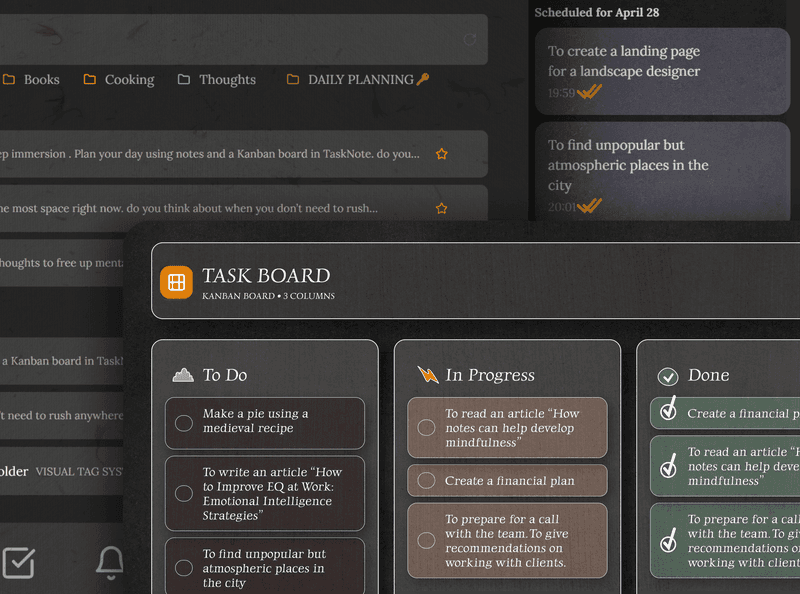
Three columns are enough. Waiting, Doing, Done. Extra columns are places for cards to hide, and a board is easier to live with than a calendar full of blocks for the same reason: it does not claim to know when you will feel like working, which is the argument in time blocking and the flexible board.
What the tool has to do, and stop doing
The workflow above needs very little, and most of what it needs is an absence.
Open before the thought goes. A global hotkey and a window that is already there. If capture takes longer than remembering, you will keep holding it in your head, which is what we were trying to stop.
Ask for nothing at capture. No required title, no project picker, no due date. A cursor on a blank page.
Stay quiet. No notifications, no badges, no counters going red, no assistant offering to improve the sentence. Every one of those is a small tax on the same attention.
Keep colour meaningful. Colour that says done or overdue is information. Colour applied for decoration is another thing to look at, and a screen that looks like a dashboard reads as work to be maintained.
Let it go offline. The connection is also a door to everything else. A tool that survives a disconnected machine lets you close that door, which is the argument in working offline on purpose.
The days it does not work
Any honest version of this has to include them, because a system that only works on good days is a system that makes bad days worse.
The dump is the part that still works when nothing else does. Ten minutes of typing requires no planning and no decisions, and it usually turns one fog into twenty-three specific things, several of which are small enough to do while you are still sitting there.
When even the board is too much, take the one card and cut it in half, then in half again, until what is written is something you can do in five minutes without thinking. "Write the report" is not a task. "Open last month's report and change the date" is.
And when a day goes entirely: the queue is a queue, not an accusation. Nothing in the waiting column got worse by sitting there. That is why it is a column and not a list of overdue items in red.
Where we sit, honestly
TaskNote is ours, so read this as a description rather than a review.
The Windows app is built around exactly this shape: a hotkey opens a blank editor over whatever you were doing, with no fields to fill in, and the kanban board is three columns with a work-in-progress limit you can set per column. There is no account, no notification, no badge and no assistant. On the machine this was written on, the window is up in about nine tenths of a second from cold, which is not milliseconds but is fast enough that the thought survives the wait.
Three things the enthusiastic version of this pitch gets wrong.
Nothing here treats anything. A quiet tool removes friction. Friction is not the whole of executive function, and a board is not a substitute for whatever else works for you.
It is not completely silent on the network. It never uploads your notes, and there is no account, no analytics library and no tracker in the app. There are two calls: it fetches a small file to see whether a newer version exists, and when the upgrade window appears it posts the fact that a paywall was shown, with the version and the trigger, and nothing that identifies the machine. You can cut both by running it offline, and everything keeps working.
Your notes are not plain files in a folder. They are rows in a SQLite database beside the app, which is what makes search and the board fast, and the export writes real .md files if you want out.
The short version
Stop asking yourself to sort a thought before you have finished having it.
Dump everything into a blank page with no fields. Read it back later and pull out the handful of lines that are actually work. Put those on a board with one card in Doing and two other columns. Delete the rest without ceremony. On a bad day, do only the first step, and make the one card smaller until it is something you can start.
The tool's job in all of this is to be fast, quiet, and to ask you nothing.
Questions
- What is low-stimulation computing?
- Using tools that ask as little of your attention as possible: no notifications, no badges, no suggestions, no colour unless the colour means something. The idea is that every element competing for attention is paid for out of the same budget you came to spend on the work.
- Why do complex task managers make it harder to start?
- Because they ask you to decide things before you can write anything down: a project, a priority, a due date, a tag. Each field is a small decision, and making five of them is often harder than the task itself, so the thought goes unrecorded and the app fills with the easy items instead.
- What is a brain dump?
- Writing down everything on your mind in one pass, unsorted and unformatted, with no attempt to decide what matters. It is not a to-do list. The list comes afterwards, from reading it back, and the reason it works is that holding things in your head and choosing between them are two jobs your attention cannot do at once.
- Why limit the Doing column to one card?
- Because a list of forty open items is not a plan, it is a reminder that you are behind. One card in Doing makes the question small enough to answer: not what should I be doing with my life, just is this still the thing. The rest of the board stays visible without asking anything of you.
- Does a kanban board help with ADHD?
- Plenty of people say a visible board with a hard limit on work in progress helps them start and keep going, and the reasons given are sensible: less to hold in mind, one decision at a time, progress you can see. It is a way of arranging work, not a treatment, and nothing here is medical advice.
focuskanbanworkflow