TaskNote vs Notion:
your data encrypted,
not merely stored
Free plan included · No card details
TaskNote suits
Private, personal notes
- 🔒 Encrypted end to end on your device
- ⚡ Opens instantly, works offline
- 📝 Notes, tasks and a board in one place
- 💸 Free plan, no card details
Notion suits
Team wikis and databases
- 👥 Collaboration across a large team
- 🗄️ Elaborate relational databases
- 🌐 Wikis meant to be public
- ⚠️ Data kept on Notion's servers
The difference that matters in TaskNote against Notion
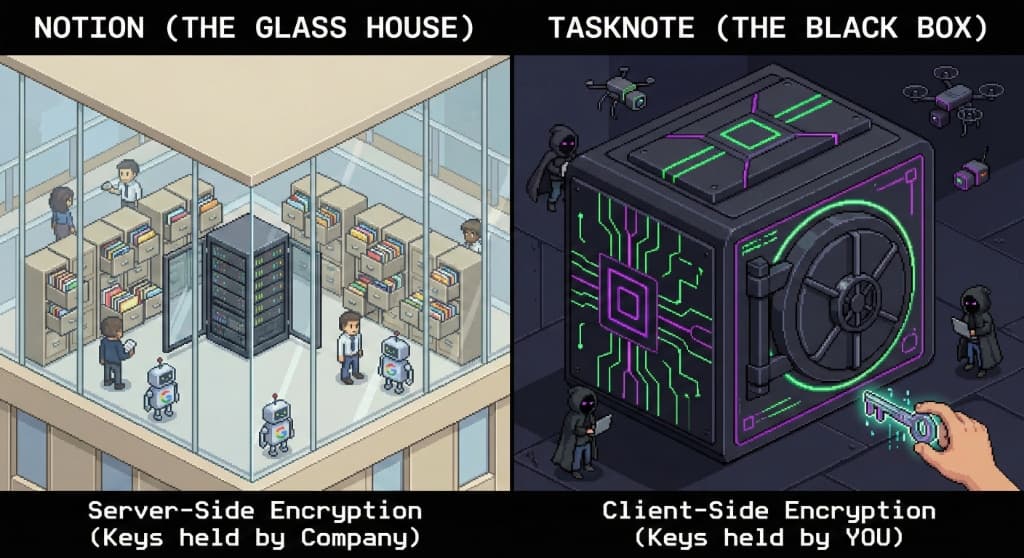
This comparison is not really about features. It is about who controls the key, which is to say who can read your notes.
Notion: encryption on the server
Notion holds the key
TaskNote: encryption on your device
Only you hold the key
TaskNote against Notion: the full comparison
What each one does, and what it does not.
| Feature | TaskNote | Notion |
|---|---|---|
| Where encryption happens | On your device | On the server only |
| Who holds the key | Only you | Notion |
| Zero knowledge | Yes | No |
| Offline | Fully offline, instant | Limited, wants a connection |
| Notes | Yes | Yes |
| Tasks | Yes, built in | Through databases |
| Kanban board | Yes, built in | Yes |
| Reminders | Yes, built in | Limited |
| Markdown export | Yes, plain Markdown | Partial, own block format |
| Team work | Personal use | Yes, built for teams |
| Free plan | Yes, no card details | Yes, with limits |
| Paid plan | One price, one person | Per member, per month |
Move from Notion to TaskNote in three steps
Bringing your notes across takes under ten minutes.
Export from Notion
In Notion's settings, export the workspace as Markdown. You get ordinary .md files.
Create your account
Sign up free at task-note.com. No card details. Your key is generated on your own device.
Import the files
Bring the Markdown into TaskNote. Everything is encrypted on your device as it arrives.
TaskNote against Notion: questions people ask
What comes up most often when weighing the two.
Is TaskNote better than Notion for privacy?+
Yes. TaskNote encrypts every note on your device before it reaches the internet. Notion encrypts on its own servers, which means Notion staff can technically reach your data. If privacy is the deciding factor, TaskNote is the better choice.
Can TaskNote replace Notion?+
For personal notes, tasks and reminders, yes. For large team wikis or relational databases shared across a company, Notion may still be the right tool for that particular job.
Is TaskNote free compared with Notion?+
There is a free plan with no card details and a seven day trial of the paid features. Notion's free plan limits page history and block count.
Does TaskNote have a kanban board like Notion?+
Yes, a board built in for personal work. It is simpler than Notion's board databases, and everything on it is encrypted on your device.
Can I import my Notion notes?+
Yes. Export the Notion workspace as Markdown and import the files. Notion writes standard .md files, which TaskNote reads directly.
Compare TaskNote with:
Stop keeping private notes in Notion
Move to TaskNote. Encrypted on your device. Free to start.
Free plan included · No card details