Work Offline on Purpose | Two Hours Nobody Can Interrupt
Pulling the plug is the cheapest focus tool there is, and most of us cannot use it because our notes and tasks live in a browser tab.
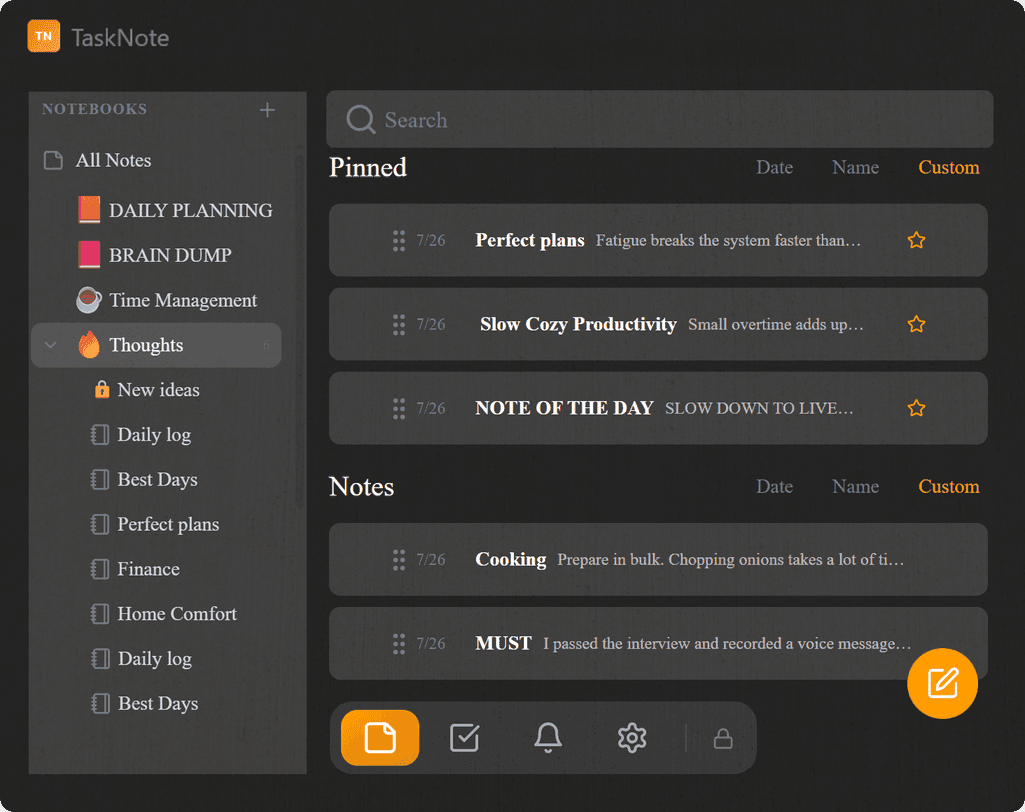
There is a focus trick that costs nothing, needs no subscription and works the first time you try it: turn the network off. Ninety minutes with no inbox, no chat, no feed. Most people cannot use it, and the reason is not discipline. It is that their notes, their task board and their plan for the day all live behind a login, in a browser tab, on somebody else's server.
This piece is about making that hour possible: what actually breaks when you disconnect, what to do about the three or four things that genuinely need the network, and how to set the whole thing up in about twenty minutes the day before.
The tab you work in is the tab you escape into
A decade of advice pushed everything into the cloud, and the tools followed: boards, journals, outlines, all of it a web page now. Sync came with it, which is genuinely useful. So did the address bar.
The web app you write in sits one keystroke away from the thing you are avoiding. That is not a character flaw, it is the room you were put in. Research on task switching keeps finding the same shape: the expensive part is not the minute spent on the other tab, it is the time it takes to load the work back into your head afterwards.
And the temptation does not have to win to be expensive. Deciding not to look is itself work, repeated every few minutes, paid out of the same attention you meant to spend on the job.
Offline is not Do Not Disturb, and not a site blocker
Three tools get confused with each other. They fail in different places.
| What it stops | Where it leaks | |
|---|---|---|
| Do Not Disturb | The sound and the banner | The messages still arrive, and you know it. Most people check anyway |
| Site blocker | A list of addresses you thought of in advance | The one site you forgot, the mobile browser, the new tab you can still open |
| Network off | Everything that needs a server | Nothing, while it lasts. The cost is that your own tools may need a server too |
The third is the only one with no negotiation in it. There is no "just five minutes" because there is no connection to bargain with. That is exactly why it is worth making your tools survive it.
What actually stops working when you disconnect
Worth knowing in advance, so the block is not spent discovering it.
| Web app in a browser | Local app on your disk | |
|---|---|---|
| Opening your notes | Needs the session, and usually the network | Opens from a file on the machine |
| Writing and editing | Works while the tab lives, saves when the network returns | Saves to disk immediately |
| Search across everything | Usually server side | Runs locally |
| Reminders and alarms | Often scheduled server side | Fire from the machine's own clock |
| Attachments and images | Fetched from a server | Already on the disk |
| Anything shared with a colleague | Not until you reconnect | Not until you reconnect |
The last line is not a defect to fix. A block of deep work is a block where nothing is shared; that is what makes it deep.
The twenty minutes the day before
The trick fails when the offline hour turns out to be the hour you need something online. A short setup the evening before prevents almost all of it.
- Pull the material down. The pages, the numbers, the brief, the spec: whatever the work reads from, put it in the note now. Copy the paragraph rather than the link.
- Write the three lines. What would make the session count, in plain words, at the top of the day's page. This is the daily notes method doing the part it is best at.
- Open what you will need. A local file, a PDF, the folder of screenshots. Nothing that has to be fetched.
- Decide when it ends. A block with an end is easier to start. Ninety minutes is plenty; two hours is the most people manage before the quality drops.
Keep a parking list
This is the habit that makes the rest work. One heading in the day's note, called "look up later". Every time you want to check something, it goes on that list instead of into a browser.
Two things happen. The urge is satisfied by the act of writing it down, which is most of what the urge wanted. And when you reconnect and read the list, half of it turns out not to matter: the question answered itself while you kept working, or the thing you were going to look up was a detour dressed as research.
Ten minutes after the block, work the list from the top and delete as you go.
When you genuinely need the network mid-block
Sometimes the parking list is not enough: the number you need is behind a login and the next hour depends on it. Three ways out, in order of preference.
Note the assumption and keep going. Write the figure you would expect, mark it in bold, carry on. Correcting one number later is cheaper than losing the state you were in.
Batch the lookups. If two or three things pile up, reconnect once, answer them all in five minutes, and disconnect again. The damage is the switching, not the connection.
End the block early and be honest about it. If the work cannot proceed, a forced hour of pretending is worse than admitting the preparation missed something. Write down what was missing; that line is the fix for next time.
Telling people you are away
An offline hour costs nothing if nobody needed you, and costs a great deal if somebody did. The fix is a sentence, not a policy.
Tell the two or three people who might need you when you will be back, and leave one channel that reaches you: a phone number, usually. That single exception removes the anxiety that makes people check chat anyway, and it is almost never used.
If your team runs on shared availability, put the block on the shared calendar under its real name. "Deep work, back at 11" is understood by everyone and questioned by nobody.
What this looks like in TaskNote
TaskNote is ours, so treat this as a description rather than a review.
The Windows app is a Go program with a SQLite file beside it: no account, no sign-in, nothing to reach for on the network. Notes, the kanban board and reminders all come from that file, so the window opens the same whether or not there is a connection. On the machine this was written on, the installer is 17.9 MB and the window is on screen about nine tenths of a second after a cold start.
A global hotkey matters more here than it sounds. The thought that arrives mid-block goes into a note without leaving the block, and becomes a card later if it turns out to be work. Text is Markdown, and every note can be exported as .md files into a folder, so the material outlives the program.
For the block itself there is a focus mode: one button takes the window fullscreen and everything around the words steps back, so the screen holds a column of text and nothing else. Escape ends it. With the network already off, that is about as few things as a screen can show you.
Two things we will not dress up. The local file is not an encrypted vault: it is a plain SQLite database, which is the right trade for speed and for working with no account, and the wrong one against somebody with access to the machine. If that is your threat, the web app is the answer, where notes are encrypted on your device before they reach us. And the window is drawn by the system's WebView2 runtime, so the memory behind it belongs to a browser engine even though we do not ship one: the Go process sits at about 27 MB of its own memory, and the runtime behind the window costs a few hundred more. Quick to open and quiet on the network is a fair claim; tiny in memory is not.
The short version
Offline is not a limitation to work around. It is the one lever on focus that works without willpower, and the only reason it feels out of reach is that our tools moved into the browser.
The checklist, in four lines:
- The evening before, put everything the work reads from into the note.
- Three lines at the top: what makes the session count.
- Network off, phone reachable, one heading called "look up later".
- Ninety minutes, then ten on the list, and delete what did not matter.
The rest of the argument is local-first.
Questions
- Does a notes app work without internet?
- A web app in a browser tab usually does not: opening it needs the session and often the network, and search runs on a server. A local app keeps its file on your disk and opens the same with the network off. Check yours by turning Wi-Fi off and opening the app cold, rather than reloading a tab that is already open.
- How long should an offline block be?
- Ninety minutes suits most people and two hours is about the limit before quality drops. The length matters less than deciding it in advance: a block with an end is easier to start, and easier to defend to other people.
- What if I need something from the internet in the middle?
- Write the assumption down in bold and keep going, or batch two or three lookups and reconnect once for five minutes. The damage is the switching, not the connection. If the work truly cannot proceed, end the block and write down what was missing, which is the fix for next time.
- Is offline the same as Do Not Disturb?
- No. Do Not Disturb silences the banner while the messages still arrive, and most people check anyway. A site blocker stops the addresses you thought of in advance. Turning the network off removes the negotiation: there is nothing to bargain with for five minutes.
- Does TaskNote need an account?
- The Windows app does not. It keeps notes, boards and reminders in a file on your own disk and opens with no sign-in and no connection. The web app is the one with an account, because it syncs and encrypts notes in the browser before they reach us.
focuslocal-firstwindows