Is Your Notes App Training AI on Your Notes | Read the Clause, Find the Switch
What the terms actually permit, where the opt-out is hidden, and the moment end-to-end encryption stops protecting anything.
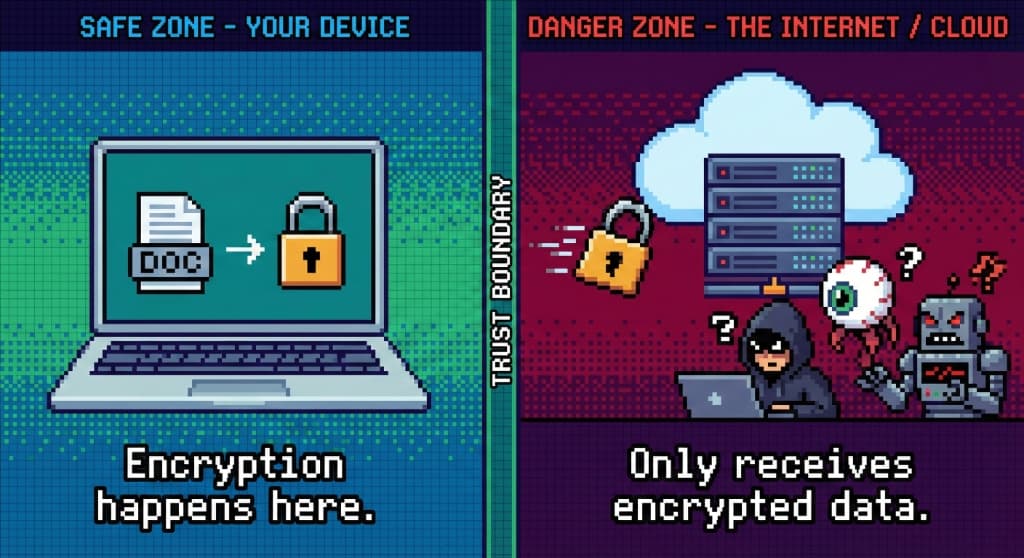
The honest version of the question is narrower than the panic around it. Nobody needs to guess whether a company is reading their diary for fun. What matters is what its terms permit, which features send your text somewhere readable, and where the switch is. All three are checkable in about ten minutes.
This is that check: the three clauses that appear in productivity apps, the difference between two phrases that sound the same and mean opposite things, and the exact moment end-to-end encryption stops protecting anything.
Three clauses, and which one to worry about
Open the terms of the app you use and search for the words "improve", "model" and "train". What comes back is usually one of three shapes.
Processing to run the service. Storing, transmitting, indexing for search, generating thumbnails. Every hosted service needs this and it says nothing about models. Not the clause you are looking for.
Improving the service. The broad one. Read it twice, because "improve our services" written in 2019 and "improve our services, algorithms and features" written last year can be the same sentence doing very different work. If the surrounding paragraph mentions machine learning, models or training, that is the answer.
An explicit training clause, with an opt-out. The clearest case, and increasingly the common one: the company says plainly that content may be used to train, and points at a setting. Clarity is worth more than vagueness here, even when the answer is yes.
What to do with the finding is a separate decision from the finding itself. A company being straight about training and giving you a switch is in better standing than one with a sentence nobody can parse.
The two phrases that sound alike
This is where most of the confusion lives, and it is worth being precise.
| Phrase | Who holds the key | Can the provider read your notes |
|---|---|---|
| Encrypted in transit | The provider | Yes, once it arrives |
| Encrypted at rest | The provider | Yes, the disk is encrypted, the service is not |
| End-to-end encrypted | You | No, it stores something it cannot open |
"We use bank-grade encryption" almost always means the first two, and the first two are normal, necessary, and no obstacle at all to a model trained on your content. The question that separates them is never the strength of the algorithm. It is who holds the key. Ours is explained at client-side encryption and the distinction itself at encryption at rest versus in transit.
Where the opt-out usually is
There is no standard, but the places repeat. In order:
- Settings, under privacy or data controls. The most common home for a switch labelled something like "improve the product with my content".
- The account or workspace level. In team products the toggle often lives with the administrator rather than the person writing the notes, which means the answer for your personal journal in a work account may not be yours to give.
- The help centre, as a form. Older products handle it by request. Slower, and it leaves your data in the default state while you wait.
- Nowhere, because there is nothing to switch. Which is the answer you get from an app that never sees your text in the first place.
Two things worth doing while you are in there. Take a screenshot of the setting after you change it, with the date. And read what it applies to: several switches cover future content only, and say so in a line under the toggle.
The moment encryption stops helping
A service can be end-to-end encrypted and still expose your text, because some features cannot work on data nobody can read. This is not a trick; it is arithmetic.
Server-side search. Searching inside encrypted notes on a server requires either decrypting them there or building an index of what they contain. If search is fast across a library you have never opened on this device, something readable exists somewhere.
Summaries and assistants. A model has to see the words. If the model runs in a data centre, the words go to the data centre. The feature being optional is the protection; using it is the exposure.
Sharing by link. A page anybody can open is a page the server can render, which means the server has the content in readable form from that moment on.
Attachments and previews. The note may be encrypted while the PDF beside it is not, because generating a thumbnail needs the file itself.
None of these make a product dishonest. They make it a product with a boundary, and knowing where that boundary runs is the whole skill.
What leaks even when the content does not
Encrypted content still travels with a shape around it, and the shape is informative.
When you write. Timestamps describe a life: the hours you work, the nights you do not sleep, the week you went quiet.
How much. Sizes and counts show a project starting and a project abandoned.
Titles, sometimes. Plenty of implementations encrypt the body and leave the title readable so that lists render quickly. Worth checking, because a list of titles is a table of contents to your year.
Who you share with. The graph of accounts is almost never encrypted.
For most people this is an acceptable residue. For a few, it is the whole threat, and those few should be keeping the notes on one machine with no service involved.
The ten minute check
Run this on the app you use now, and write the answers in a note. It is the same shape as the export drill in leaving a notes app, and for the same reason: better to know while nothing is wrong.
- Search the terms for "train", "model" and "improve". Copy the sentence you find.
- Find the switch, or establish that there is none. Screenshot it.
- Open Settings and list the features that would need to read your text: search, summaries, tagging, sharing. Decide which you actually use.
- Turn the network off and open the app. If your notes are still there, the exposure has a limit. If they are not, everything you write is on a server by definition.
- Check whether titles are encrypted, not just bodies, if the app claims end-to-end encryption.
- Write down the date you checked. Terms change, and the next version is not announced in a way you will notice.
Where we stand, plainly
TaskNote is ours, so treat this as a description and check it rather than taking it on trust.
The web app encrypts notes in your browser before they reach us. We hold what the diagram at the top of this piece shows: a blob we cannot open, and the key never leaves your device. That is not a promise about our intentions, it is a property of the arrangement: there is no readable copy on our side to train anything on, by us or by anybody we might one day work with. The price is the one every honest implementation names: lose the key and the notes are gone, and features that would need us to read your text do not exist.
The Windows app answers the question differently, by not participating. No account, no sync, no backend: notes, boards and reminders live in a file on your disk and nothing is sent anywhere. What we will not claim is that the file is a vault. It is a plain SQLite database, readable by anyone with access to that machine, which is the right trade for speed and for working with no account and the wrong one against a person sitting at your desk. Full disk encryption, which Windows provides, is the layer that closes that gap.
Neither product has an assistant reading your notes, and that is a design decision rather than a feature we have not got to yet. The argument for it is in notes without AI.
The short version
Do not argue with the industry about whether this is happening. Check your own app: find the clause, find the switch, list the features that need to read your text, and see what survives with the network off. Then decide what belongs in a service and what belongs in a file on your own machine. Most people end up splitting their writing between the two, and that turns out to be the right answer rather than a compromise.
Questions
- Can a notes app use my notes to train AI?
- If your notes reach its servers readable, the terms usually permit some processing, and the wording that matters is what it permits beyond running the service. Read the clause about improving the service and look for the words model and training. If the content is encrypted on your device before it leaves, there is nothing usable to train on.
- Does encryption stop AI training?
- Only if the company cannot decrypt it. Encrypted in transit and at rest means the provider holds the keys and can read your notes whenever it needs to. End-to-end means the key stays with you. The two phrases look similar and mean opposite things about who can read what.
- How do I opt out of AI training in my notes app?
- Look in Settings under privacy or data controls first; many apps have a switch there now. If there is none, check the account or workspace admin area, then the help centre for a form. Take a screenshot of the setting after you change it, and read what it applies to: some switches cover future data only.
- Is my data still exposed if I use the app's AI features?
- Yes, by design. A summary or a chat over your notes needs the text in readable form wherever the model runs, which is normally a server. Turning the feature on is what sends the text; the question is whether the provider then keeps it.
- What is the safest setup for a private journal?
- A local app whose file never leaves the machine, or a service that encrypts on your device and never sees the plaintext. Add full disk encryption for the machine itself, because a plain local file is readable by anyone with access to it.
privacyailocal-first