What is client-side encryption?
In short:
Client-side encryption means the locking happens on your own device, using your own processor. The server only ever receives the encrypted result. The opposite is server-side encryption, where you send readable data to the cloud and the cloud locks it for you, keeping the key.
✉️ The envelope
Picture sending a confidential contract to a storage company.
- Server-side encryption, the usual kind: you hand the contract to the manager. He reads it, puts it in an envelope, seals it and shelves it. He promises not to open it again, but he sealed it, so of course he can unseal it.
- Client-side encryption, what TaskNote does: you put the contract in a steel box at home, lock it with your own padlock, and hand over the locked box. It goes on the shelf. He cannot read the contract, because he never saw it open and has no key.
⚠️ What the word encryption often hides
When an app advertises bank grade encryption or encryption at rest, it usually means server-side encryption.
That protects your data from thieves breaking into a data centre. It does not protect your data from the company holding it.
- Their administrators can read what you wrote.
- A court order obliges them to hand it over, decrypted.
- If their login system is breached, so is your content.
Client-side encryption takes trust out of the arrangement. The server is treated as storage that nobody has to trust.
⚙️ How it works in your browser
Browsers are not only for showing pages. Every modern one carries a cryptography engine, the Web Crypto API.
- You type. A note in TaskNote.
- Your processor takes over. Before anything is saved, it takes your encryption key and the text.
- It locks. The AES-256 algorithm runs on your machine.
- It sends. The resulting nonsense goes to our servers.
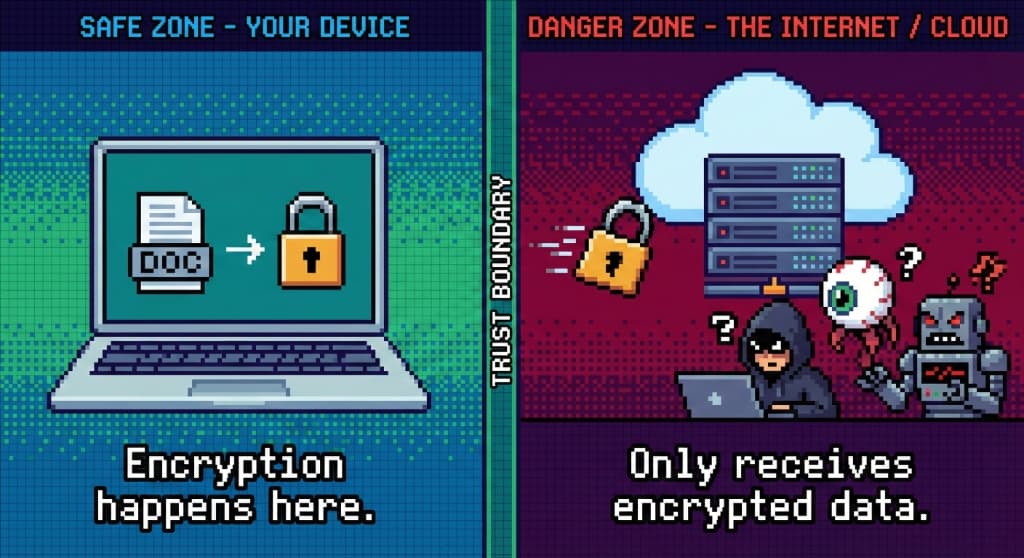
It costs a sliver of battery. In exchange the privacy is a matter of mathematics rather than of promises.
🛡️ Why we build it this way
Privacy should not be a setting you have to find.
Encrypting on your device buys three things:
- Speed. The work happens where you are. Nothing waits on a server to process your text.
- Safety. Anyone tapping the line between you and us collects encrypted noise.
- Certainty. No model is being trained on your private thoughts, because nothing on our side can read them.
❓ Questions people ask
Does this drain my battery?
Not noticeably. Phones have dedicated hardware for this. Encrypting a note costs less energy than loading one photograph.
Can I still search my notes?
Yes, it just happens elsewhere. Your encrypted index comes down to your device, is unlocked in memory and searched there. That is also why search feels instant: it is local.
Why does not every app do this?
Because it is harder to build, and because it closes doors. Server-side encryption is simple and leaves the content available for advertising and for training models. Client-side encryption removes that option, so many companies quietly skip it.