Offline first, explained
In short:
Offline first is a way of building software where the app saves to a database on your own device first, and sends it to the server afterwards. Ordinary web apps stall when the connection does. An offline first app does not notice.
🎬 Streaming against a downloaded file
Think of watching a film online next to watching one you already have.
- Online only. You press play, it buffers, and the moment the connection drops you are looking at a spinner. You are tied to the cable.
- Offline first. The file is already on the disk. Press play and it plays. The network is beside the point.
- Syncing. Now imagine that file quietly updating itself whenever you happen to be online.
TaskNote works the second way. Your notes are not fetched from a server each time you open them. They live with you.
🐌 What goes wrong with the usual approach
Most modern services are built online first.
- Every action asks the server. A keystroke, a click, a checkbox.
- You wait. A fraction of a second, usually. Sometimes considerably longer.
- The lift, the tunnel, the bad hotel Wi-Fi. The app drops into read only or throws an error, and you stop working.
⚡ How offline first works
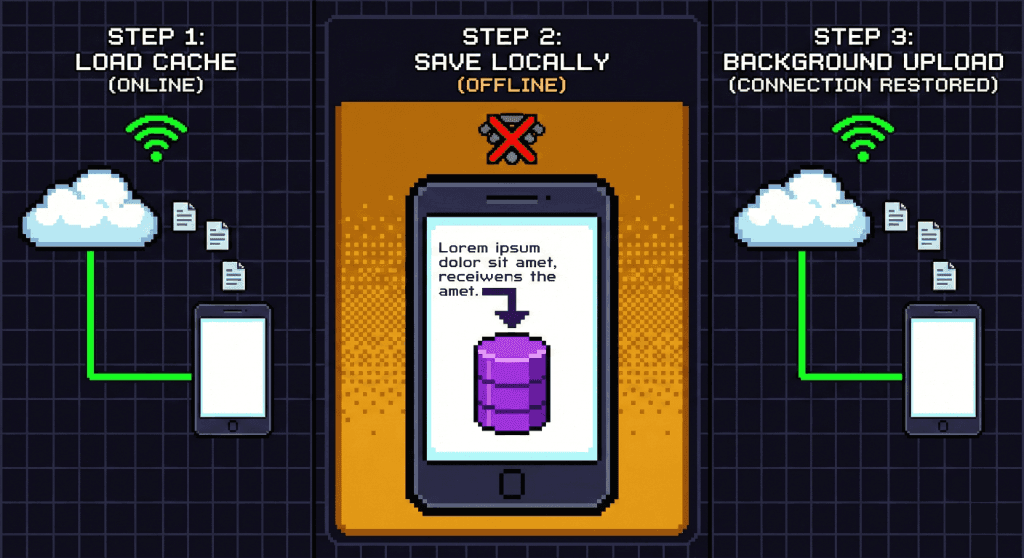
The main copy of your data lives on your device. The cloud is the backup, not the original.
- It writes locally. As you type, the text goes into an encrypted database on your device, in hundredths of a second.
- It syncs in the background. A separate process watches the network and pushes changes up when there is a connection. When there is not, it waits.
- It merges. Edit the same note on two devices while both are offline, and the changes are reconciled once they meet again.
🏆 Why we build this way
Not only for speed. Mostly for not letting you down.
Put together with client-side encryption, it makes something closer to a private vault than to a web page:
- Nothing lags. The interface never sits waiting on a server before it shows you a letter you typed.
- Anywhere works. Aeroplanes, trains, cellars, cabins. Your notes came with you.
- Even our bad day is fine. If our servers go down, you carry on working locally.
Your ideas should not have to wait for a signal.
❓ Questions people ask
Does it fill up my phone?
Text weighs almost nothing. War and Peace is about three megabytes. Thousands of your notes take up less room than one photograph.
What if I close the tab before it syncs?
The writing is already saved in the browser's persistent storage. Close it offline, and the next time you open the app with a connection, it goes up.
Do I need a connection to sign in?
Once, yes. The first sign in brings down your keys and your notes. After that you can stay offline as long as you like.