TaskNote cho Windows, một ứng dụng máy tính riêng
Ghi lại ý ngay lúc nó đến, và giữ nó trên chính máy của bạn. Dùng miễn phí, và không cần tài khoản.
Phiên bản 1.0.38 · Có gói miễn phí · Windows 10 và 11 (64-bit) · Chạy được hoàn toàn khi không có mạng

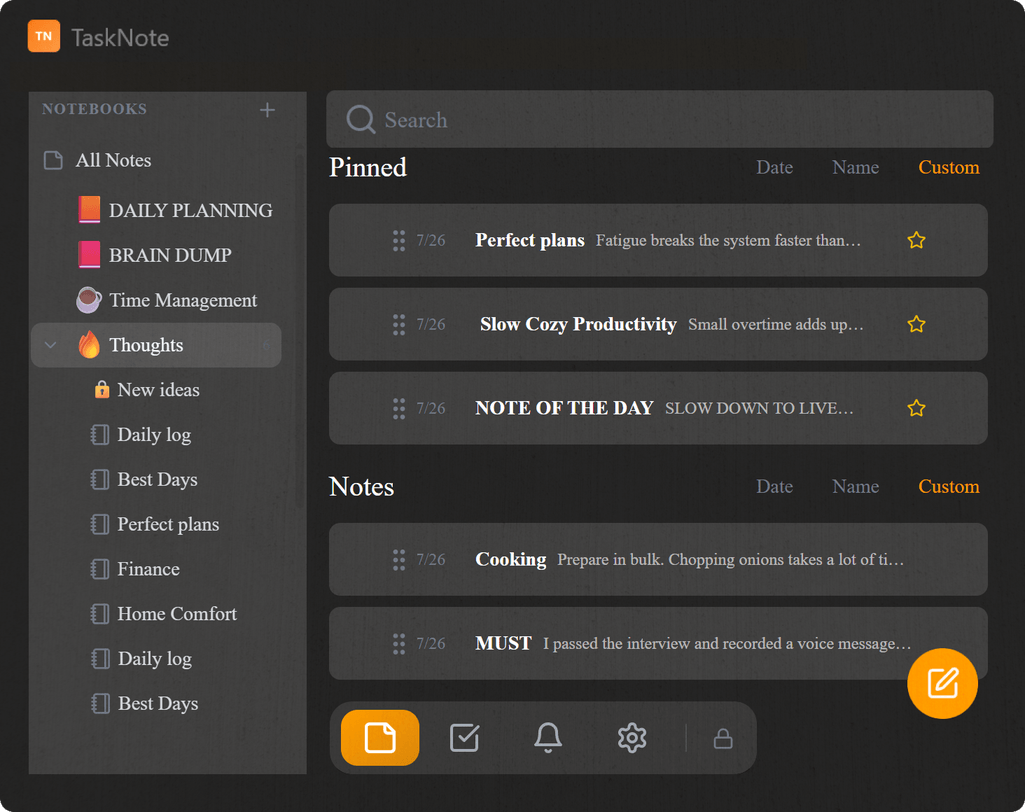
Đây là một ứng dụng riêng, không phải bản web của TaskNote. Nó được dựng theo lối chạy tại máy và ưu tiên ngoại tuyến: mọi thứ ở lại trong một cơ sở dữ liệu trên máy bạn, không đồng bộ đi đâu, và dùng thì cũng chẳng cần mạng. Muốn ghi chú theo bạn giữa các thiết bị? Vậy hãy dùng bản web.
Nó nằm ở thanh tác vụ, không phải một thẻ trình duyệt
Nó mở ra thành cửa sổ riêng, có biểu tượng trên thanh tác vụ và chỗ trong khay hệ thống. Không dính gì tới trình duyệt. Một phím tắt toàn cục bắt lấy ý nghĩ từ bất cứ đâu trong Windows, kể cả khi ứng dụng khác đang ở trước.
- Biểu tượng riêng trên thanh tác vụ và cửa sổ riêng
- Phím tắt toàn cục để ghi nhanh từ bất cứ đâu
- Nằm trong khay hệ thống cho dễ với tới
- Mở ra là dùng ngay, khỏi qua trình duyệt
Ghi chú, công việc và một tấm bảng kanban
Viết ghi chú có định dạng, xếp vào thư mục, rồi chạy phần việc trên tấm bảng kéo thả, với màu cột, biểu tượng bảng, phóng to và di chuyển bằng bàn phím. Tất cả trong một ứng dụng.
- Ghi chú có định dạng và thư mục
- Một tấm bảng kéo thả
- Biểu tượng bảng và cột do bạn chọn
- Nhắc việc trên ghi chú hay công việc bất kỳ

Nằm tại máy và riêng tư, không đồng bộ lên đám mây
Mọi thứ bạn viết nằm trong một cơ sở dữ liệu trên máy bạn. Chẳng có gì tự tải lên, và ứng dụng chạy được khi không có mạng. Nếu máy dùng chung, bạn có thể đặt một mật khẩu cho nó.
- Dữ liệu ở lại trên máy của bạn
- Chạy được khi không có mạng
- Đặt mật khẩu lúc mở, nếu bạn muốn
- Không đo đạc từ xa, không theo dõi quảng cáo
Bắt đầu miễn phí, nâng cấp đúng một lần
Không thuê bao. Gói miễn phí đủ cho việc thường ngày, còn Lifetime là một lần mua duy nhất, gỡ mọi giới hạn vĩnh viễn.
Miễn phí
Đủ để xem nó có hợp với bạn không
- Tối đa 50 ghi chú
- Tối đa 10 thư mục, mỗi thư mục 50 ghi chú
- Tối đa 50 công việc
- 3 tấm bảng
- Tối đa 10 lời nhắc
- Không cần tài khoản và không cần thẻ
Lifetime PRO Trả một lần
Trả một lần rồi giữ luôn
- Ghi chú và thư mục không giới hạn
- Công việc và bảng không giới hạn
- Nhắc việc không giới hạn
- Một lần thanh toán, không gia hạn, mãi mãi
- Kích hoạt ngay trong ứng dụng bằng mã bản quyền
Câu hỏi về TaskNote cho Windows
Ứng dụng Windows có miễn phí không?
Có, tải và dùng đều miễn phí, chỉ có giới hạn về ghi chú, thư mục, công việc, bảng và lời nhắc. Bản Lifetime trả một lần gỡ hết những giới hạn đó.
Nó có phải là ứng dụng web không?
Không. Đây là một ứng dụng riêng, đặt máy của bạn lên trước. Nó giữ mọi thứ trong một cơ sở dữ liệu trên máy bạn, chạy hoàn toàn không cần mạng, và không đồng bộ với bản web, với điện thoại hay với máy nào khác.
Lúc cài Windows có cảnh báo không?
Có thể có. SmartScreen báo là ứng dụng lạ vì bộ cài chưa được ký bằng chứng thư trả phí. Chọn Thông tin thêm rồi chọn Vẫn chạy.
Có cần mạng không?
Không. Mọi thứ nằm trên máy bạn nên nó chạy hoàn toàn khi không có mạng. Chỉ cần mạng khi kích hoạt mã bản quyền Lifetime.
Cập nhật thế nào?
Nó tự kiểm tra xem có bản mới không, và báo ngay trong ứng dụng khi có bản sẵn sàng để cài.
Ứng dụng Windows của TaskNote
Tải về, cài vào, rồi bắt đầu viết. Có gói miễn phí, chạy hẳn ngoại tuyến, và không cần tài khoản.
Tải cho WindowsCó gói miễn phí · Windows 10 và 11 · Bản Lifetime trả một lần là tùy chọn