Ứng dụng ghi chú có bảng kanban, một chỗ cho cả hai
Viết ghi chú và kéo công việc qua lại giữa các cột trong cùng một chỗ, khỏi phải xoay giữa một công cụ tài liệu, một tấm bảng và một ứng dụng ghi chú.
Đăng ký bằng Google hay email bất kỳ rồi bắt đầu ngay. Phần cốt lõi miễn phí: không cần thẻ, không phải cấu hình, cũng không phải học trước.
Có gói miễn phí · Không cần thẻ · Windows, Mac, Linux, iPhone, iPad, Android
Một trình soạn ghi chú thật sự, không phải cái ô mô tả
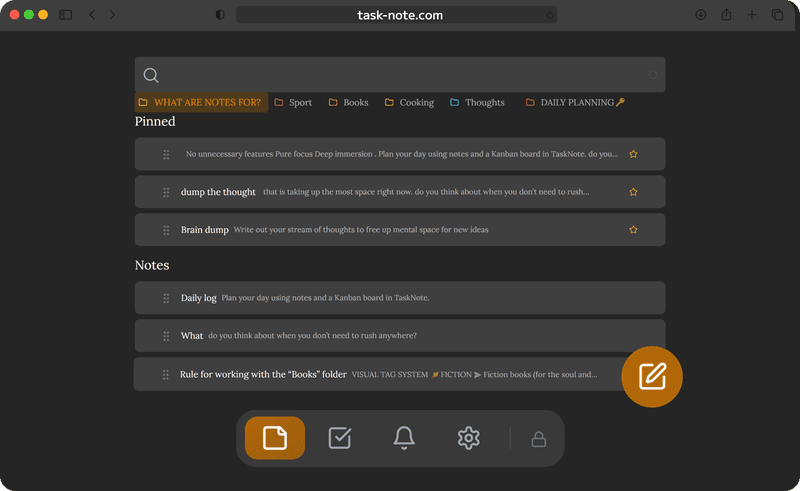
Phần lớn các tấm bảng chỉ cho tấm thẻ một ô mô tả nhỏ. Ở đây mỗi ghi chú có hẳn một trình soạn thảo: tiêu đề, in đậm, in nghiêng, danh sách, ô đánh dấu, liên kết và khối mã. Bài dài đọc lên chẳng khác gì trong một ứng dụng chuyên để viết.
- Trình soạn có định dạng, dùng được lối viết tắt Markdown
- Tiêu đề, gạch đầu dòng, danh sách đánh số, ô đánh dấu
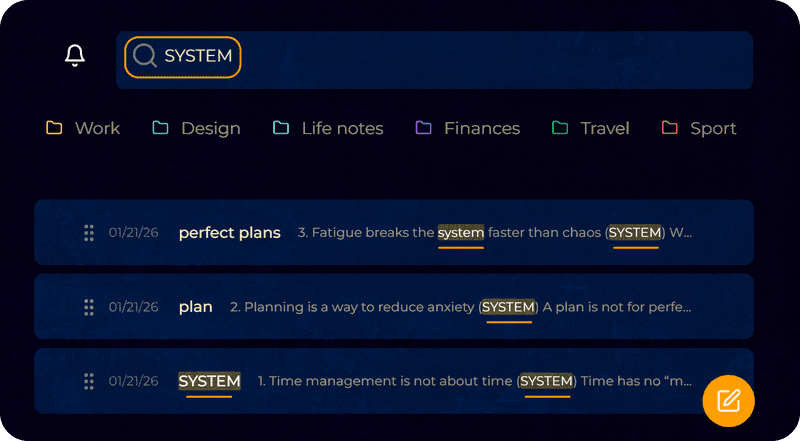
- Tìm toàn văn khắp mọi ghi chú, ra ngay
- Ghim thứ quan trọng để nó nằm trên cùng
Một tấm bảng mà mỗi tấm thẻ có một ghi chú
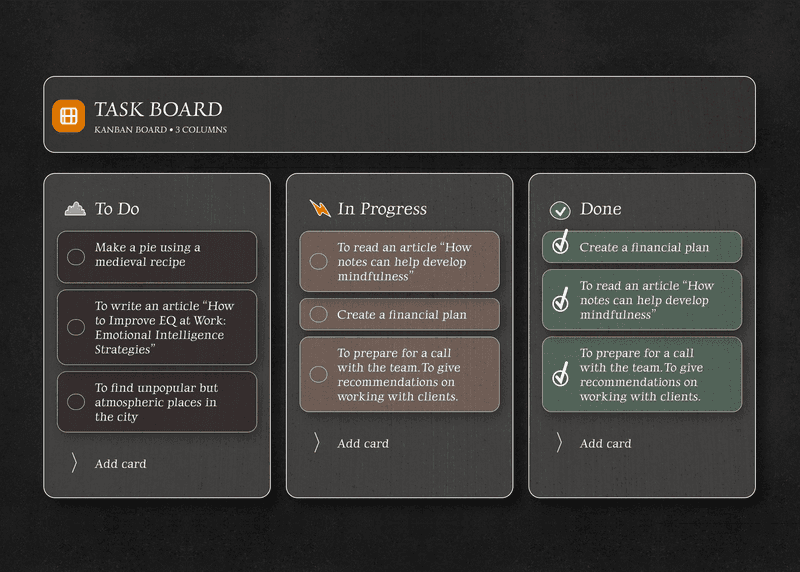
Chuyển sang bảng rồi kéo công việc giữa Cần làm, Đang làm và Xong. Mỗi tấm thẻ mang theo một ghi chú đầy đủ, nên bối cảnh, liên kết và danh sách kiểm đi cùng công việc khi nó dịch chuyển.
- Kéo thả qua lại giữa các cột
- Gắn một ghi chú đầy đủ vào tấm thẻ bất kỳ
- Bao nhiêu cột và thẻ tùy bạn
- Sắp lại thứ tự công việc ngay trong một cột
Nhắc việc trên ghi chú và trên công việc
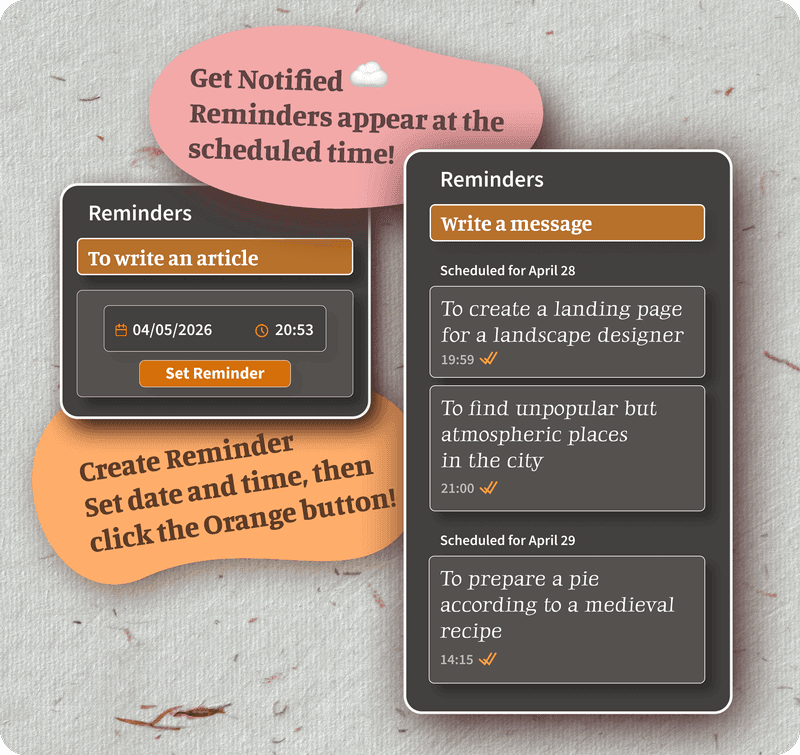
Đặt lời nhắc lên ghi chú hay tấm thẻ bất kỳ, rồi trình duyệt sẽ báo đúng lúc, dù đó là biên bản họp cần đọc lại hay một công việc sắp quá hạn.
- Nhắc việc trên từng ghi chú riêng
- Nhắc việc trên các tấm thẻ ở bảng
- Trình duyệt báo cả ở bàn làm việc lẫn trên điện thoại
- Lời nhắc tự tới mọi thiết bị
Mã hóa, và có mặt trên mọi thiết bị bạn dùng
Ghi chú và thẻ được mã hóa ngay trên thiết bị trước khi tới máy chủ. Mở trên Mac, cầm điện thoại lên, mọi thứ đã ở đó, đúng bản mới nhất và không ai khác đọc được.
- Mã hóa đầu cuối cho cả ghi chú lẫn công việc
- Trên máy chủ chỉ có bản mã
- Tới được Mac, Windows, iPhone, iPad và Android
- Ghi chú đã tải rồi thì không có mạng vẫn đọc được
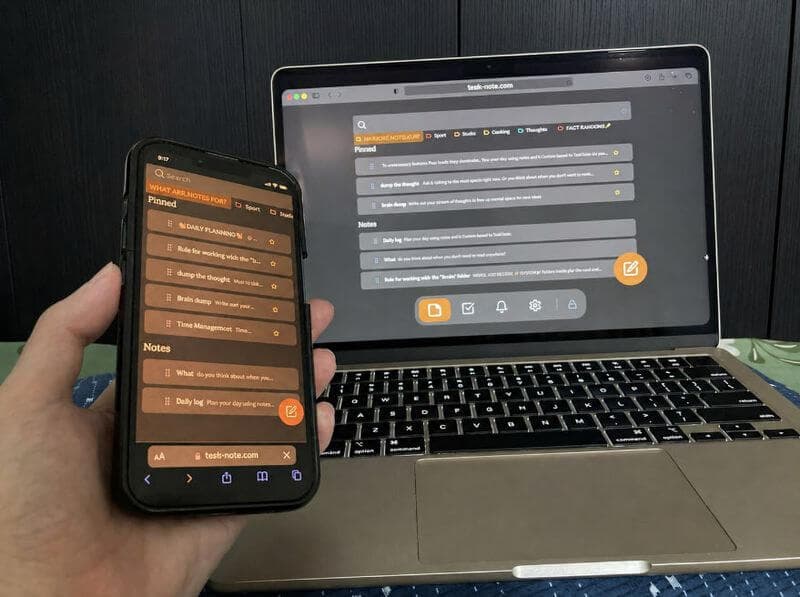
Chạy trên mọi thiết bị bạn dùng
Mở bằng trình duyệt là ghi chú với bảng đã ở đó. Chẳng phải cài gì.
Câu hỏi về ghi chú và bảng đi cùng nhau
Ghi chú và bảng thật sự ở cùng một chỗ chứ?
Đúng vậy. Một trình soạn ghi chú đầy đủ và một tấm bảng kanban dùng chung một chỗ. Viết ghi chú rồi đưa nó sang cột công việc, hoặc gắn một ghi chú chi tiết vào tấm thẻ bất kỳ, mà không phải đổi ứng dụng.
Gắn ghi chú vào thẻ trên bảng được không?
Được. Bên trong mỗi tấm thẻ đều có trình soạn có định dạng. Viết bối cảnh, thêm danh sách kiểm, dán liên kết, chia bằng tiêu đề, và tất cả nằm luôn trong chính công việc đó.
Có miễn phí không?
Phần cốt lõi thì có: 50 ghi chú, 50 công việc, tấm bảng, nhắc việc và mã hóa đầu cuối. Cũng không hỏi tới thông tin thẻ.
Dùng trên iPhone, iPad và Android được không?
Được, trong mọi trình duyệt: Safari trên iPhone và iPad, Chrome trên Android, còn Mac với Windows thì tùy bạn quen dùng gì. Ghi chú và bảng sang tới mọi thiết bị ngay trong lúc bạn làm.
Ghi chú và công việc có được mã hóa không?
Cả hai đều được. Mọi thứ mã hóa đầu cuối trên thiết bị của bạn trước khi đồng bộ, và chúng tôi không đọc được.
Tôi có phải cài gì không?
Không. Nó chạy trong trình duyệt. Mở trên thiết bị nào cũng được, ghi chú và bảng đã sẵn sàng.
Ghi chú và bảng, cuối cùng cũng ở cùng một chỗ
Viết ghi chú, kéo công việc, đặt nhắc việc, tất cả trong một chỗ miễn phí. Không thuê bao, cũng không phải nhảy qua nhảy lại giữa các ứng dụng.
Dùng miễn phíCó gói miễn phí · Không cần thẻ · Windows, Mac, Linux, iPhone, iPad, Android